
Workflow Sandbox Details
The diagram below explains the Update flow as an entity goes through through the worflow and approvals process provided by the Enterprise module. Each lane showcases how new entities are created/updated/archived in active entity alongside the supporting Sandbox Worklfow tables in the database.
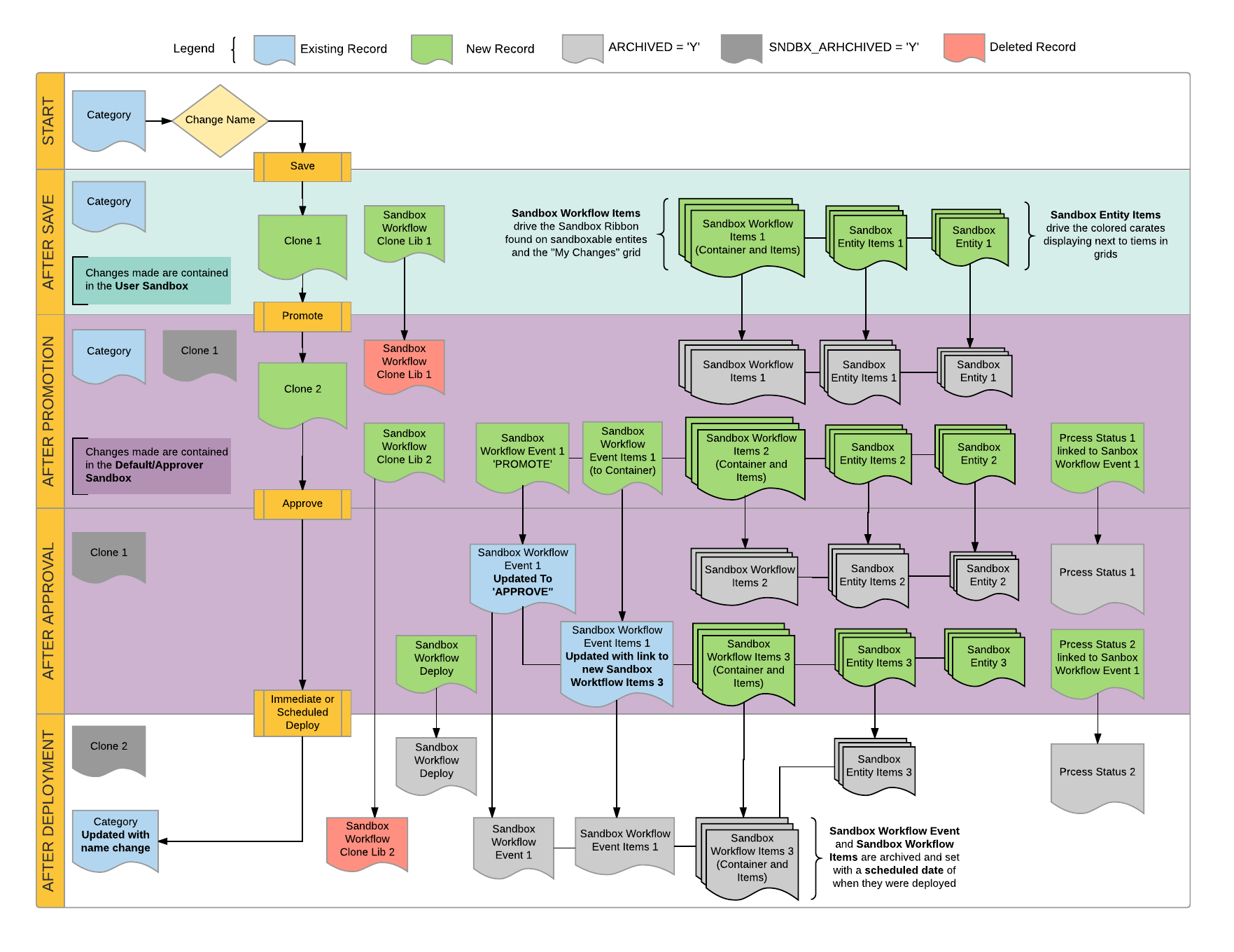
Start
Update the name on Category Clearance, with an ID of 2004 to Going Fast

After Save
Changes are contained in the User Sandbox, denoted by the Light Green color in the diagram

Category Changes
- Category :
BLC_CATEGORYClone 1will be created for the changed entity, in this case, aCategoryClone 1will haveSNDBX_TIER = 1,SNDBX_ORIG_ITEM_ID = 2004,SNDBX_ORIG_RECORD_ID = 2004Clone 1will haveSNDBX_IDpointing to theUser Sandbox- There is no change to the original record as is it is the Production record
- CloneLib :
BLC_SNDBX_WRKFLW_CLONE_LIB- An entry will be created that will link
Sanbox Workflow Clone Lib 1to the original record. When the system needs to find a record by ID, it will check against the clone lib to check if there is a clone that it needs to retrieve instead.
- An entry will be created that will link
Sandbox Workflow Changes
- Sandbox Workflow Items :
BLC_SNDBX_WRKFLW_ITEMSanbox Workflow Items 1will be created- Drives the My Changes grid and is used to hold basic details about an individual change.
- At least two records will be created
- A
containerrecord that will that is used to contain all the changes that occurred, also referred to as the changeset. - The changes will be held in
itemrecords that will be linked to thecontainerrecord. In this case, since we only made one change, we will only get one record. If multiple changes are made, each change will have an item record.
- A
- Sandbox Entity Items :
BLC_SNDBX_ENTITY_ITEMSanbox Workflow Entity Items 1will be created- Each Sandbox Workflow Item created will point to a Sandbox Entity Item
- Holds information regarding the entity that had the change
- Drives the colored carets displaying next to items within a grid in the admin
- This is related to the sandbox item via the
ENTITY_ITEM_IDcolumn in eachBLC_SNDBX_WRKFLW_ITEMrecord
- Sandbox Entity :
BLC_SNDBX_ENTITYSanbox Workflow Entity 1will be created- Record used to house the class type of the entity changed
After Promotion
Changes are contained in the Default/Approver Sandbox, denoted by the Light Purple color in the diagram

Category Changes
- Category :
BLC_CATEGORYClone 1will be be set toARCHIVED = 'Y'andSNDBX_ARCHIVED_FLAG = 'Y'Clone 2will be created for the changed entity, in this case, aCategoryClone 2will haveSNDBX_TIER = 2,SNDBX_ORIG_ITEM_ID = 2004,SNDBX_ORIG_RECORD_ID = 2004Clone 2will haveSNDBX_IDpointing to theDefault/Approver Sandbox
- CloneLib :
BLC_SNDBX_WRKFLW_CLONE_LIBSanbox Workflow Clone Lib 1will be deletedSanbox Workflow Clone Lib 2will be created pointing to the original record
Sandbox Workflow Changes
- Sandbox Workflow Items :
BLC_SNDBX_WRKFLW_ITEMSanbox Workflow Items 1will be archived by setting theARCHIVED_FLAG='Y'and aSCHEDULED_DATESanbox Workflow Items 2will be created
- Sandbox Entity Items :
BLC_SNDBX_ENTITY_ITEMSanbox Workflow Entity Items 1will be archived by setting theARCHIVED_FLAG='Y'Sanbox Workflow Entity Items 2will be created
- Sandbox Entity :
BLC_SNDBX_ENTITYSanbox Workflow Entity 2will be created
- Sandbox Workflow Event :
BLC_SNDBX_WRKFLW_EVENTSanbox Workflow Event 1will be created withPROMOTION_TYPE = 'PROMOTION'- Links to a list of
Sandbox Workflow Event Items
- Sandbox Workflow Event Items :
BLC_SNDBX_WRKFLW_EVENT_ITEMSanbox Workflow Event Items 1will be created- One record will be created for each
Sandbox Workflow Item containerfound in the changeset
- Process Status :
BLC_PROCESS_STATUSProcess Status 1will be created- This record points to the
Sanbox Workflow Event 1
After Approval
Changes will remain in the Default/Approver Sandbox until the deployment occurs. Deployments can be scheduled to deploy immediately or sometime in the future.

Category Changes
- Category :
BLC_CATEGORY- No change
- CloneLib :
BLC_SNDBX_WRKFLW_CLONE_LIB- No change
Sandbox Workflow Changes
- Sandbox Workflow Items :
BLC_SNDBX_WRKFLW_ITEMSanbox Workflow Items 2will be archived by setting theARCHIVED_FLAG='Y'and aSCHEDULED_DATESanbox Workflow Items 3will be created
- Sandbox Entity Items :
BLC_SNDBX_ENTITY_ITEMSanbox Workflow Entity Items 2will be archived by setting theARCHIVED_FLAG='Y'Sanbox Workflow Entity Items 3will be created
- Sandbox Entity :
BLC_SNDBX_ENTITYSanbox Workflow Entity 3will be created
- Sandbox Workflow Event :
BLC_SNDBX_WRKFLW_EVENTSanbox Workflow Event 1will be updated withPROMOTION_TYPE = 'APPROVE'- Links to a list of
Sandbox Workflow Event Items
- Sandbox Workflow Event Items :
BLC_SNDBX_WRKFLW_EVENT_ITEMSanbox Workflow Event Items 1updated to point to the new Sandbox Workflow Items
- Process Status :
BLC_PROCESS_STATUSProcess Status 2will be created- This record points to the
Sanbox Workflow Event 1
- Sandbox Workflow Deploy :
BLC_SNDBX_WRKFLW_DEPLOYSandbox Workflow Deploy 1will be created with the information for the upcoming deployment.
After Deployment
Changes will go into production.

Category Changes
- Category :
BLC_CATEGORYClone 2will be be set toARCHIVED = 'Y'andSNDBX_ARCHIVED_FLAG = 'Y'
- CloneLib :
BLC_SNDBX_WRKFLW_CLONE_LIBSanbox Workflow Clone Lib 2will be deleted
Sandbox Workflow Changes
- Sandbox Workflow Items :
BLC_SNDBX_WRKFLW_ITEMSanbox Workflow Items 3will be archived by setting theARCHIVED_FLAG='Y'and aSCHEDULED_DATE
- Sandbox Entity Items :
BLC_SNDBX_ENTITY_ITEMSanbox Workflow Entity Items 3will be archived by setting theARCHIVED_FLAG='Y'
- Sandbox Entity :
BLC_SNDBX_ENTITY- No change
- Sandbox Workflow Event :
BLC_SNDBX_WRKFLW_EVENTSanbox Workflow Event 1will be archived by setting theARCHIVED_FLAG='Y'and aSCHEDULED_DATE- Links to a list of
Sandbox Workflow Event Items
- Sandbox Workflow Event Items :
BLC_SNDBX_WRKFLW_EVENT_ITEMSanbox Workflow Event Items 1updated to point to the new Sandbox Workflow Items
- Process Status :
BLC_PROCESS_STATUSProcess Status 2will be archived by setting theARCHIVED_FLAG='Y'
- Sandbox Workflow Deploy :
BLC_SNDBX_WRKFLW_DEPLOYSandbox Workflow Deploy 1will be archived by setting theARCHIVED_FLAG='Y'and aSCHEDULED_DATE